

Radonix interface
2-Axis CNC Controller for Sheet Metal Punching Machines
High-speed, accurate hole/slot punching from DXF or Metalix CAM files—with travel-optimized sequencing, safe clamp management, and optional auto tool-change.
- Axes
- 2-Axis
- Machine class
- Two-axis CNC sheet-metal punching machines
- Input
- DXF and Metalix® output files (NC/DXF)
- Controllers
- PC Smart 4APC Smart 3ASPC-Pro LAN 4A
01
Interface profile
Introduction
With CAM-Pro and compatible Radonix controller hardware, the XY CNC controller interface coordinates two-axis sheet positioning and punching-machine I/O for repeatable production.
- Who uses it
- Metal, aluminum, and molding industries (HVAC, perforated/decor panels, signage, appliance panels).
- Works with
- XY tables/gantries driving servo, hydraulic, or crank punch systems.
- Compatible controllers
- PC Smart 4APC Smart 3ASPC-Pro LAN 4A
- Supported files
- DXF and Metalix® output files (NC/DXF)
02
Machine architecture
Machine & Kinematics
Machine & Kinematics
XY positioning over clamped or vacuum-held sheets; homing & soft limits.
Punch head with vertical stroke (machine-side), triggered from I/O.
Configurable keep-out zones for clamps; origin presets for remnant reuse.
Control & I/O
Live Absolute/Relative readout and Velocity (mm/s); feed override slider; Play/Pause/Stop with safe resume.
Outputs: Punch/Fire, Pump/Power, Holder/Tool-lock, beacons/alarms.
Inputs: Up/Down sensors, stroke-complete, pressure/air OK, door/guard, E-stop.
Tunable timing parameters (e.g., ClampDelay, HolderDelay, ToolLockDelay, RepositionGap, RepositionVelocity).
03
Software workflow
Software & Workflow
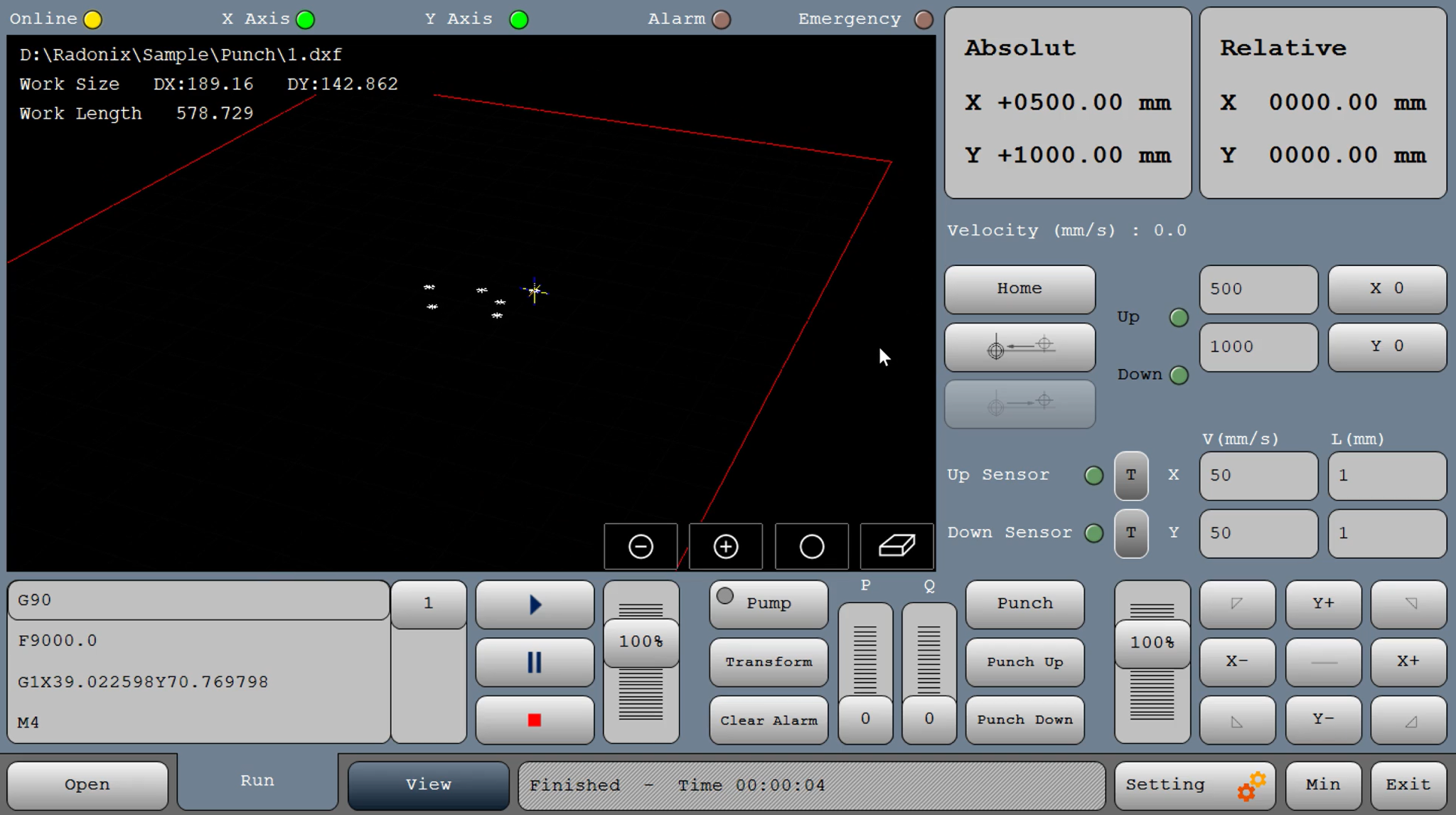
- 01Open
DXF/Metalix file → preview grid appears.
- 02Set origin
and confirm clamp keep-outs.
- 03Choose rules:
dwell times, nibbling step/overlap, double-hit if needed.
- 04Dry-run
(punch off) to verify order and clamp clearances.
- 05Run job
use feed override and safe Pause/Resume.
- 06Save report
(hits, time, alarms) for traceability.
04
Interface capabilities
Key Features of Radonix CNC Software
Software & Workflow
DXF-first or Metalix import: open a DXF/NC and see an immediate path grid preview.
Automatic feature handling for holes/slots/rectangles → generates a hit list and groups by size.
Hit Sequencer: shortest-path travel, double-hit/multi-pass rules for thicker stock, and nibbling (linear/arc) with step/overlap.
Automatic Repositioning: executes designs larger than the table—pauses at programmed gaps, prompts clamp move, resumes with alignment checks.
Built-in Simulation mode (punch off), X0/Y0 origin tools, and per-axis jog for quick set-up.
Key Capabilities (at a glance)
DXF and Metalix file compatibility
Travel-optimized hit sequencing; group by feature size
Nibbling (linear/arc) with user step & overlap
Auto workpiece repositioning for oversize parts
Safe clamp keep-outs; Pause/Resume; feed override
Full alarm stack, Up/Down sensors, job logging
Direct DXF Execution
Seamlessly load and execute DXF files without the need for G-code conversion — streamlining your workflow and reducing setup time.
Smart Component & Path Management
Select specific parts from complex drawings and customize cutting order with intuitive control over toolpath sequencing.
Interactive On-Screen Editing
Scale, rotate, and mirror parts directly within the interface — with live toolpath previews to ensure precision.
Flexible Part Placement
Manually drag and drop parts onto your material sheet to accommodate irregular shapes, pre-cut stock, or remnant reuse.
Advanced Pause Controls
Set up to three independent pause points — before the cut, during the cut, and after the cut — for manual checks or operational adjustments.
Reverse Cutting Mode
Execute toolpaths in reverse to minimize material warping or adjust final exit points based on design needs.
Simulation / Demo Run Mode
Perform a complete dry-run motion test with the punch disabled to verify the punching sequence and machine travel.
Support for servo, hydraulic, and pneumatic systems.
The interface drives any actuation type with configurable dwell and timing, plus pressure/air-OK and stroke-complete checks for safe, repeatable hits. Clamp/holder/tool-lock delays are tunable in milliseconds to match your machine.
Support for automatic tool-changing systems
Built-in ATC logic handles tool call, unlock/lock, holder lift, and position verification with a tool table (T01…T06) and per-tool offsets. Tools can be selected from DXF/Metalix programs or manually, with guided recovery after a stop.
05
Technical reference
Typical Specifications
| Area | Spec |
| Axes /Modes | XY punching (single or multi-tool) |
| Actuation | Servo, Hydraulic, or Crank systems |
| Files | DXF, Metalix® outputs (NC/DXF) |
| Tooling | Single tool; Auto Tool-Change (ATC) optional |
| Planning | Shortest-path sequencing; multi-pass/double-hit; nibbling |
| Repositioning | Automatic with programmable gap & velocity |
| I/O | Pump/Power, Punch/Fire, Holder/Lock, beacons/alarms; Up/Down & stroke sensors |
06
Operating evidence
Videos & Demos
Real-world clips of Radonix interfaces on production machines—setup, operation, quality tips, and quick troubleshooting.
07
Compatible hardware