

Radonix interface
Jewelry CNC Interface with X4 Multi-Motor Expansion
Multi-axis, DXF-native CNC control for rings & bangles—with simulation, probe/laser scan, ATC, and power-fail resume
- Axes
- Up to 6 Independent Axes
- Machine class
- Ring, bangle, engraving and multi-motor jewelry CNC machines
- Input
- DXF and standard G-code .
01
Interface profile
Introduction
With CAM-Pro and compatible Radonix controller hardware, the jewelry CNC controller interface supports up to six independent interpolated axes and configuration-dependent X4 motor distribution.
- Who uses it
- ideal for jewelry manufacturers, boutique ateliers, OEM machine builders, and high-volume engraving labs.
- Compatible controllers
- PC Smart 4APC Smart 6APC-Pro LAN 4APC-Pro LAN 6ARadonix X4 Expander
- Supported files
- DXF and standard G-code .
02
Machine architecture
Machine & Kinematics
Machine & Kinematics
- Jewellery machines are usually rotary-based engravers/turning cells with one or more linear slides and one or more spindles/rotaries. The controller maps program space (what the toolpath describes) to machine space (how each axis moves) through a small set of transforms.
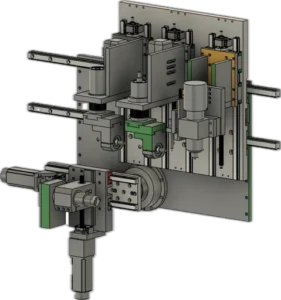
Radonix is able to control up to the main axes, including X, Y, Z, and C, as shown in the figure. This is a sample of a mechanical system that can be supported by Radonix Controllers.
Radonix X4 distributes one controller-axis pulse source to multiple physical motor channels; it does not add independent interpolated axes. Depending on the machine configuration, a jewelry system can use approximately 12 physical motor channels while the controller remains limited to six independently interpolated axes.
For example, an X4 board can distribute an X command to X1/X2/X3/X4 motors, while another group can distribute a Z command to Z1/Z2/Z3. Motors in each group share the source-axis pulse command and are selected or distributed according to the machine configuration.
Control & I/O
Step/Dir line-driver outputs for steppers/servos; encoder input (e.g., spindle sync/threading)
0–10 V / PWM analog for VFD spindle or laser power; digital RUN/DIR/ENABLE
NPN/PNP selectable digital inputs; opto-isolation for noise immunity
Relay / transistor digital outputs for valves, clamps, pumps, tower lights, covers
Mapped safety chain: E-STOP, doors/interlocks, pressure OK, over-travel limits
Diagnostic pages for InPorts/OutPorts with live state & manual toggle
Prebuilt I/O tags (ClampPin, ToolPower, LaserEnabled, Vacuum, etc.) + easy reassignment
Remote commissioning & support via AnyDesk; wiring maps and test utilities included
03
Software workflow
Software & Workflow
- 01Load
DXF/G-code and review preview.
- 02Set origin
and verify sheet alignment.
- 03Apply settings:
motor-group selection, axis distribution, tool offsets and jewellery-process settings.
- 04Simulate / Dry-run
to confirm limits and path order.
- 05Run job
with monitored pauses for clamps/consumables.
- 06Save report
and notes for traceability and repeat work.
04
Interface capabilities
Key Features of Radonix CNC Software
Software & Workflow
- Import DXF/G-code, preview toolpaths, and apply kerf/offset automatically.
- Lead-in/lead-out styles (arc, radial, tangential), pierce dwell, and height retract macros.
- Corner smoothing and arc handling to maintain cut speed and edge quality.
- Priority ordering (inner → outer) and automatic pause points for clamp moves or checks.
DXF-native workflow with 3D preview of ring/bangle paths.
Parameter panels for speed, depth, offsets, references and multi-axis synchronization.
Start-from-line, reverse/skip entity, and safe park logic for operator control
- Job Queue & Repeat for batches; simulation / dry-run before cutting.
- Run reports: cycle time, cut length, pierces, pauses/restarts; operator notes saved with the job.
Key Capabilities (at a glance)
• Jewelry machines with up to six independently interpolated axes and approximately 12 physical motor channels through X4, configuration-dependent.
• Automatic calculation of spindle rotation axis (C-Axis).
• Capability to create various default effects.
• Execution of multiple files sequentially with automatic repeatability (Multi-File).
• Laser scanning of the workpiece surface for compensating uneven surfaces.
• Automatic execution of two-dimensional designs on curved surfaces.
• Support for automatic tool and head-changing systems.
• Support for 4-axis star machines.
Up to 6 independent axes with X4 motor-channel distribution
Use synchronized physical motor groups without increasing the controller’s six-axis interpolation limit.
Automatic C-axis computation
The controller computes spindle rotation for true radial engraving and wrap-around toolpaths.
Preset effects
Save and reuse finishing styles (hatch, dot, texture) for repeatable aesthetics
Multi-File queueing
Sequentially execute multiple jobs with automatic repetition for batch runs.
Laser surface scanning
Compensates live for curvature/irregularities on precious-metal surfaces before cutting.
Capability to create various default effects.
Execution of multiple files sequentially with automatic repeatability (Multi-File).
Laser scanning of the workpiece surface for compensating uneven surfaces.
Automatic execution of two-dimensional designs on curved surfaces.
Support for automatic tool and head-changing systems.
2D-to-Curved mapping
Apply flat DXF artwork to cylindrical/domed jewellery with a single workflow.
Simulation / Demo Run Mode
Perform a complete dry-run motion test to verify motor-group selection and toolpaths before production.
Automatic tool/head change
Macros and I/O for turrets, linear magazines and auxiliary heads.
Power-Fail Resume
Saves the last executed G-code line and resumes from that point after power is restored.
Full Simulation (no machine required)
Preview toolpaths, verify clearances, and optimize feeds before production.
05
Technical reference
Typical Specifications
| Area | Spec |
| Axes / Modes | Jewelry CNC Interface with X4 Multi-Motor Expansion |
| File Formats | DXF, standard G-code |
| Compensation | Axis distribution, offsets, smoothing and arc tolerance |
| Performance | High look-ahead planner; steady velocity on arcs |
| I/O | Safety relays , Signals , Breakers , Sensors , Laser |
| Work Offsets | Multiple origins for sheet/remainder reuse |
| Reports | Time, executed paths, alarms and notes |
06
Operating evidence
Videos & Demos
Real-world clips of Radonix interfaces on production machines—setup, operation, quality tips, and quick troubleshooting.
07
Compatible hardware