Author: Nima Rad
Table of Contents
- Motion Control Quality and Smoothness
- Axis Count and Interpolated Axes
- Axis Control Method
- Communication and Industrial Protocols
- Ease of Installation, Setup, and Calibration
- Simplicity and Quality of the User Environment
- Documentation
- Standardization for Series Production and OEM
- Comparing Real-World System Cost and Pricing
- Overall Suitability by Machine Type and Level
- Summary
Introduction
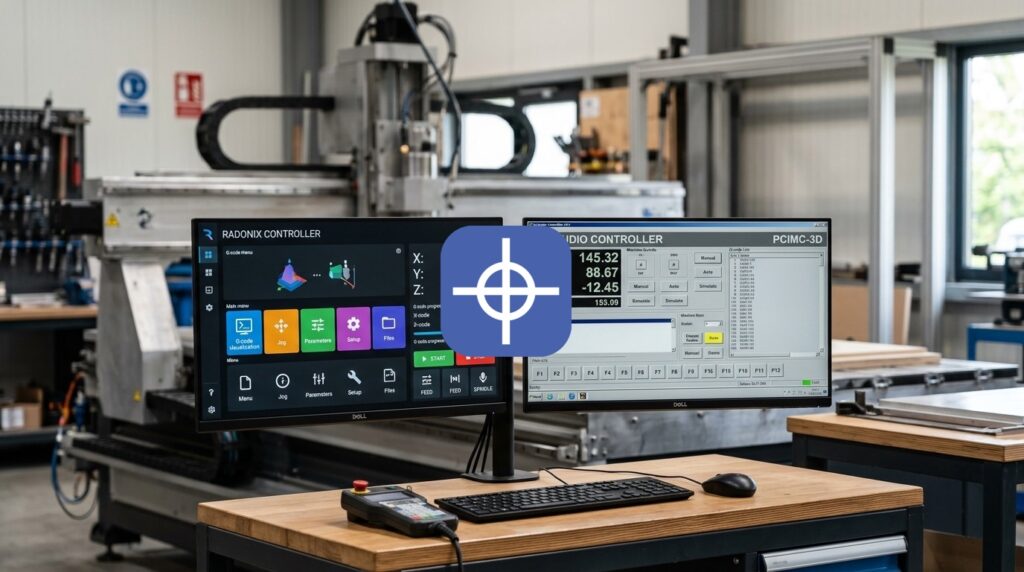
A Radonix vs NCStudio controller comparison is something machine builders run into when choosing or reviewing the control system for their CNC machines. This choice isn’t limited to axis count or G-code execution alone; motion quality, axis control method, input/output capability, ease of installation, the user environment, scalability, troubleshooting, cost, and after-sales service all affect the machine’s final quality.
Radonix and NCStudio both belong to the family of computer-based CNC control systems, but their design philosophy and architecture differ in certain areas.
NCStudio covers a broad family of control systems — from common 3- and 4-axis motion cards to newer systems with more advanced capabilities such as industrial networks, simultaneous multi-axis control, and advanced motion features.
Radonix, for its part, offers a hardware controller alongside CAM-Pro software, a dedicated machine interface, and calibration, test, and simulation tools, all within one defined ecosystem.
So in a Radonix vs NCStudio controller comparison, choosing between the two systems is best done based on a combination of technical and practical criteria.
1. Motion Control Quality and Smoothness
Motion quality is one of the most important specifications of a CNC controller.
This quality isn’t determined by the pulse frequency number alone. Factors such as the following all affect the machine’s real-world motion:
- Interpolation
- Trajectory planning
- Acceleration
- Deceleration
- Jerk
- S-curve
- Look ahead
- Path smoothing
- Corner handling
- Short segment processing
Radonix Some Radonix controllers offer features such as interpolated axes, an S-curve speed profile, hardware FIFO, and a pulse rate up to 500 kHz per axis.
The S-curve profile makes speed and acceleration changes smoother and transfers less shock to the servo, stepper, and the machine’s mechanical parts.
The hardware FIFO also stores part of the motion commands in the controller before execution, helping the path run continuously.
NCStudio NCStudio also has suitable motion algorithms across its generations, and newer systems offer features such as path smoothing, adaptive speed control, corner deceleration, high-speed positioning, and fast processing of short segments.
In more advanced models, motion capabilities have also been developed for multi-axis machines.
Comparison result Both systems can deliver suitable industrial motion. NCStudio, in its more advanced tiers, offers very extensive capabilities in high-speed and multi-axis motion.
Radonix, on the other hand, gives the machine builder a fairly defined, simple architecture that covers most needs of a conventional industrial CNC, including S-curve, interpolation, and hardware FIFO.
As a result, for a large share of 3-to-6-axis industrial machines, Radonix offers a good combination of motion quality and simple configuration.
2. Axis Count and Interpolated Axes
Axis count alone isn’t enough; it also matters how many axes can be interpolated simultaneously.
Radonix The Radonix controller family offers models for different axis counts, with 3-, 4-, and 6-axis controllers available. On the relevant models, several axes can be interpolated at the same time.
NCStudio NCStudio also offers various systems, from 3- and 4-axis units to advanced multi-axis systems. High-end models also support 5-axis machines and systems with even more axes.
Comparison result For most industrial machines in the 3-to-6-axis range, both systems meet the machine builder’s needs. In projects that need a very large number of axes, complex kinematics, or five-axis RTCP, some advanced NCStudio models offer more specialized capabilities.
3. Axis Control Method
One of the most important criteria for choosing a controller is how it sends commands to the drives.
Common methods include:
- Pulse/direction
- Analog
- CANopen
- EtherCAT
- Other real-time industrial networks
Radonix On many Radonix controllers, axis position control is based on pulse/direction. On the relevant models, the pulse rate goes up to 500 kHz per axis. This method is compatible with a wide range of servo and stepper drives and is a simple, stable, economical solution for many CNC machines.
NCStudio Pulse/direction is also very common on classic NCStudio systems. In newer generations, some systems also support real-time networks such as EtherCAT and bus-based methods.
Comparison result For conventional machines built around servos and steppers with pulse/direction, Radonix offers a simple, suitable architecture. In projects designed from the start around a servo network and real-time networks, newer NCStudio systems offer a wider range of choices.
4. Number and Type of I/O
Besides its motion axes, an industrial CNC has a large number of signals, such as:
- Home
- Limit
- Emergency
- Servo alarm
- Servo ready
- Tool sensor
- Vacuum
- Spindle
- Valve
- Clamp
- Lubrication
- Safety sensor
Radonix Depending on the controller model, the machine builder gets a varying number of digital inputs, digital outputs, analog inputs, analog outputs, and PWM. For example, in the Smart and Pro-LAN series, I/O count can be chosen depending on the model, from simple systems to machines with relatively large I/O needs.
NCStudio On NCStudio too, the number of inputs and outputs depends entirely on the chosen controller and terminal board. Larger systems also allow increasing the I/O count.
Comparison result For a conventional CNC machine, both systems offer suitable capacity. Having a good number of I/O and analog/PWM directly on some Radonix controllers can simplify panel design, while in very large systems, expansion capability becomes more important.
5. Communication and Industrial Protocols
The type of communication between the controller and the PC and other equipment affects the system’s stability and panel design.
Radonix On many Radonix controllers, communication between the PC and controller happens over Ethernet/LAN – TCP/IP. Ethernet allows a suitable distance between the PC and the panel, simple cabling, and stable communication.
NCStudio The communication structure varies across generations. Some classic versions use a motion card installed inside the PC, while newer systems have Ethernet, RS485, and, on specific models, real-time networks as well.
Comparison result For a standalone CNC, Radonix’s Ethernet creates a simple, suitable architecture. In projects where the controller needs to be part of a broader automation network, newer NCStudio systems offer more communication options.
6. Ease of Installation, Setup, and Calibration
One hidden cost of any controller is machine commissioning time.
Radonix Radonix gives the machine builder tools such as CAM-Pro, CAM-Pro Calibrator, and CAM-Pro Test. CAM-Pro Calibrator is used for axis calibration and correcting the ratio between the command and actual motion. CAM-Pro Test is used for testing the controller and initial commissioning. Defining inputs, outputs, speed, acceleration, and other settings is also done within the CAM-Pro ecosystem.
NCStudio NCStudio also has configuration and machine parameter tools. On card-based versions, installing the controller card and driver is also part of the initial steps. Newer versions offer a simpler, more integrated configuration process.
Comparison result Both systems can be commissioned, but the combination of CAM-Pro, Calibrator, and Test makes Radonix’s commissioning path well-defined and repeatable for the machine builder. This matters even more when producing several similar machines.
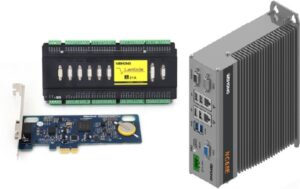
PM95A Motion Control Card + Lambda Terminal Board — a common NCStudio setup where the card is installed inside the PC and connects to the machine through the terminal board.
7. Simplicity and Quality of the User Environment
The software environment is what the operator interacts with the most, every day.
Radonix One important feature of CAM-Pro is the Machine-Specific Interface concept — meaning the interface can be designed around the machine’s actual function, and the operator isn’t necessarily faced with a busy, generic CNC screen. Only the functions the machine actually needs can be placed on the main screens.
NCStudio NCStudio also has a suitable graphical environment for CNC control, and newer generations offer more customization.
Comparison result Both systems offer a suitable environment for the operator. But CAM-Pro’s interface-based approach makes it possible to design a simple, dedicated environment for a specific machine with good flexibility. This matters especially when the machine’s operator isn’t a CNC specialist.
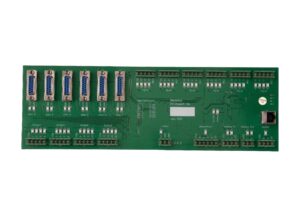
The Radonix PC-Smart 6A controller
8. Interface/HMI Design and Editing Capability
On a commercial machine, the software is part of the product’s look and identity.
Radonix CAM-Pro has an Interface Editing Environment. The machine builder can change items such as buttons, text, images, size, position, color, and alignment. Interface elements can also be linked to functions, parameters, inputs, and outputs. So changing the interface’s appearance and behavior happens in one unified environment.
NCStudio Newer NCStudio generations also offer tools for custom UI and screen configuration.
Comparison result Both systems support customization. But in Radonix, the link between the Interface Editor and functions, parameters, and I/O is built directly into the CAM-Pro architecture. For a machine builder that regularly changes the interface across different machines, this structure can simplify the development process.
9. Software Development and Machine Logic
Many newer machines have their own dedicated sequences and logic.
Radonix CAM-Pro allows the use of functions, parameters, variables, inputs, and outputs to implement the machine’s behavior. As a result, many of the machine’s processes can be implemented without creating a fully independent software project.
NCStudio Newer NCStudio systems also have extensive development capabilities and offer more customization in complex projects.
Comparison result For typical CNC process logic, Radonix’s structure can be simpler and faster. In very advanced automation projects, NCStudio’s higher-level development capabilities can also be put to use.
10. Simulation, Diagnostics, and Troubleshooting
Fast troubleshooting has a direct effect on commissioning time and after-sales service.
Radonix CAM-Pro has a Simulation Mode that allows testing parts such as G-code, toolpaths, inputs, outputs, functions, and motion parameters without actually running the machine. CAM-Pro Test can also be used to test the controller directly.
NCStudio NCStudio also has tools for simulation, I/O diagnostics, parameter monitoring, and machine status.
Comparison result Both systems offer suitable capabilities in this area. By putting simulation, test, and configuration together with CAM-Pro, Radonix creates a fairly simple workflow for the machine builder.
11. Documentation
Having complete documentation means the system’s knowledge doesn’t stay with just the original installer or designer.
Radonix Radonix’s documentation covers various topics such as hardware, input, output, installation, calibration, interface, functions, parameters, simulation, and interface editing.
NCStudio NCStudio also has extensive manuals covering installation, programming, operation, wiring, configuration, and hardware. Because of the wide variety of product families, the right documentation needs to be matched carefully to the hardware and version.
Comparison result Both systems have suitable technical documentation. Because the controller and CAM-Pro are integrated, the documentation path in Radonix tends to be fairly centralized for a machine builder.
12. Industrial Robustness, Isolation, and Noise Resistance
A CNC controller operates in an environment where equipment such as VFDs, servo drives, contactors, and spindles can generate significant noise.
Radonix Various Radonix controllers use optical isolation in the relevant sections. Ethernet is also used for PC-to-controller communication.
NCStudio The level of isolation and hardware design varies by controller model. Newer systems are designed for industrial use and have improved significantly in reliability compared to earlier generations.
Comparison result Both systems can perform well in an industrial environment with correct wiring, grounding, and shielding. With Radonix, having clearly defined hardware and I/O architecture makes panel design and isolation assessment easier for the machine builder.
13. After-Sales Service and Maintenance
A controller needs to remain serviceable years after the machine is sold.
Radonix The controller, CAM-Pro, interface, and configuration sit within one defined ecosystem. So a technician can check a large part of the system through that same set of tools.
NCStudio NCStudio also has suitable service capabilities, but given the variety of generations and hardware, the repair and maintenance process can differ by model.
Comparison result In series production, having a standardized controller and software matters a great deal. Radonix’s integrated structure can simplify technician training and maintaining similar machines.
14. Standardization Capability for Series Production and OEM
In industrial production, machines of the same model need to have as similar a configuration as possible.
Radonix A specific controller, interface, I/O configuration, parameters, and calibration can be created for one machine, and the same structure repeated on subsequent machines.
NCStudio NCStudio has also been used in OEM projects for years and has good capability for series production.
Comparison result Both systems are usable for OEM work. For companies that want to produce several machine models without building a large software team, Radonix’s interface and configuration architecture can simplify product development and repeatability.
15. Development Capability for Complex, Special-Purpose Machines
A machine’s complexity isn’t determined by axis count alone. A 3-axis machine, for example, may have multiple sensors, an automatic loader, a pneumatic sequence, a tool changer, safety logic, process control, and a dedicated interface.
Radonix The ability to build a dedicated interface, along with function, parameter, and I/O management, makes Radonix flexible for machines that have dedicated processes and HMI needs.
NCStudio NCStudio also offers a wide range of controllers, and its more advanced models have specialized capabilities for multi-axis control, RTCP, and advanced kinematics.
Comparison result On machines where the main complexity relates to HMI, process, and I/O, Radonix is a notable option. On high-end machines where the main complexity is kinematics, a very high axis count, or a real-time servo network, some advanced NCStudio models offer more capability.
16. Comparing Real-World System Cost and Pricing
Why does the controller’s own price matter? Many comparisons focus on total cost of ownership, but a controller’s initial price also matters a great deal to the machine builder — especially when a machine model is going into production runs, where even a few-hundred-dollar difference in the controller can have a noticeable effect on the overall project. So the hardware price should be compared first, with additional costs added on top.
Radonix controller pricing At current general pricing, some Radonix models are offered in roughly the following range:
- PC Smart 3AS (3-axis): about $400
- PC Smart 4A (4-axis): about $800
- PC Smart 6A (6-axis): about $1,050
- PC-Pro LAN 4A (industrial 4-axis): about $1,000
- PC-Pro LAN 6A (industrial 6-axis): about $1,300
In this pricing structure, CAM-Pro is included with the controller, and no separate subscription or license fee is stated for it. The standalone price of the PC Smart 4A is also reported at around $790–810 in other sources, which lines up with the stated $800 figure.
NCStudio controller pricing NCStudio pricing depends heavily on the generation, axis count, and hardware type. Current market pricing samples for genuine 4-axis controllers show:
- PCIMC-74A (4-axis): about 83,000 rubles
- PM95A-4A (4-axis): about 98,067 rubles
At the exchange rate on September 6, 2026, these amounts are roughly equivalent to:
- PCIMC-74A: about $960
- PM95A-4A: about $1,130
So comparing a genuine, industrial 4-axis controller against a 4-axis Radonix, the prices land in a fairly similar range. For example, the Radonix PC Smart 4A at roughly $800 compares to the reviewed 4-axis NCStudio samples at roughly $960–1,130. But if the PC-Pro LAN 4A at around $1,000 is used as the baseline instead, the price gap becomes much smaller.
It’s worth noting that NCStudio pricing varies a lot in the market. Older versions, used units, or products with different specs may be sold at lower prices, so any comparison should be made strictly between genuine, comparable hardware with a similar axis count.
PC and peripheral equipment costs Radonix is a PC-based system, so it needs a computer to run CAM-Pro. Card-based NCStudio systems also need a PC, and some controller cards need a terminal board or interface board in addition to the PC. For example, PM95A-based systems use a control card installed in the PC along with a terminal board.
On the other hand, some newer NCStudio generations come as an integrated CNC system, where the CPU, storage, and display interface are part of the system itself. So these systems’ pricing can’t be directly compared to the price of just a motion controller card.
Software cost Software is one part of the cost that needs to be considered. With Radonix, CAM-Pro software comes with the controller, and no separate periodic subscription or license fee is factored into the general sale price. When evaluating an NCStudio system, it also needs to be clarified exactly what hardware, software, licenses, and terminal boards the quoted price includes, since configurations vary.
Development and commissioning cost This part sometimes ends up costing more than the controller itself. If setting up a controller takes extra time for installation, drivers, parameter setup, I/O configuration, HMI development, calibration, and testing, that time ultimately becomes part of the machine’s final cost.
Having CAM-Pro, the calibrator, test tools, and the interface editor in one ecosystem can reduce part of this engineering cost on Radonix projects.
After-sales service cost A controller’s cost isn’t paid only at the time the machine is built. Over the machine’s life, there can be costs for technician training, troubleshooting, software, replacement hardware, and reconfiguration. Integrated hardware and software can also create economic value in this area.
Pricing summary If we compare just the price of 4-axis controllers in current market samples, Radonix isn’t necessarily the more expensive option, and in some comparable comparisons it even has a lower initial price. For example, the PC Smart 4A at a general price of around $800 is competitive on hardware price against the genuine 4-axis NCStudio samples observed at roughly $960–1,130.
That said, this result shouldn’t be generalized to every model in both families, since pricing changes with axis count, hardware generation, features, and sales market. So for a real decision, it’s better to line up five figures side by side: controller price + software price + peripheral equipment price + commissioning cost + support cost.
In such a comparison, Radonix — especially in 3-to-6-axis systems — can be a notable option in terms of price-to-capability ratio.
17. Overall Suitability by Machine Type and Level
It’s better to judge a controller’s suitability not by the machine’s name, but by its level of complexity.
Standard industrial machines A large share of industrial CNC machines have an overall structure of 3 to 6 axes, servo or stepper motors, pulse/direction control, a moderate amount of I/O, a spindle, sensors, home and limit switches, a few side processes, and an operator HMI. For such machines, both systems have the necessary capabilities. At this level, Radonix can be a simple, practical option thanks to the integration of the controller, CAM-Pro, interface, and commissioning tools.
Machines with dedicated processes On some machines, axis count isn’t very high, but the machine has automatic sequences, multiple sensors, a pneumatic system, tool change, an automatic loader, safety logic, and dedicated operator screens. On such systems, the ability to design the interface and directly link HMI elements to functions, parameters, and I/O becomes very important. CAM-Pro’s structure gives the machine builder a good way to create a dedicated HMI for this category of machine.
High-end, multi-axis machines At a higher level, a machine may need five-axis RTCP, advanced kinematics, a very high axis count, multi-channel control, an EtherCAT servo network, and complex high-speed machining controls. In such projects, some advanced NCStudio systems offer a wider range of capability, and the controller choice should be based on the machine’s exact architecture. This category of machine usually makes up a smaller share of the general CNC market and also needs more specialized engineering.
OEM machine building and series production For a machine builder planning to produce one or several machine models in high volume, other criteria become important: configuration repeatability, fast technical staff training, ease of installation, the ability to back up settings, a dedicated interface, after-sales service, and controller price. In this situation, reducing system complexity can matter as much as the controller’s raw technical power. By combining hardware and CAM-Pro into one ecosystem, Radonix offers a notable structure for this type of project.
Overall result If the project is a conventional to fairly advanced industrial CNC, and factors such as 3 to 6 axes, suitable motion quality, a dedicated interface, I/O, simple commissioning, after-sales service, and a reasonable price matter, Radonix can be a serious option to consider.
NCStudio also covers a very wide range of machines, from simple to high-end, and offers notable specialized capabilities at the higher end. So the final choice should be based on the machine’s actual architecture, not just the controller’s name.
Summary
Radonix and NCStudio are both serious CNC control systems, and each has clear strengths.
NCStudio has a broad product family and, in its advanced generations, offers features such as multi-axis control, advanced motion, network-based servo control, and advanced kinematics.
Radonix, on the other hand, has tried to bring a large share of a machine builder’s needs into one integrated ecosystem, made up of controller + CAM-Pro + interface + calibration + test + simulation. One notable point in a closer look is pricing.
Current pricing shows that Radonix doesn’t necessarily fall into the more expensive controller group. For example, the PC Smart 4A, priced at around $800, is fully competitive against the genuine 4-axis NCStudio samples reviewed, and CAM-Pro comes bundled with the controller. On the other hand, a controller’s real value can’t be determined from a datasheet or price alone.
Factors such as the actual motion quality on the machine, setup speed, ease of calibration, interface simplicity, troubleshooting time, and operator experience are usually only revealed once the system is tested on a real machine.
For that reason, for a machine builder currently choosing or reviewing their control system, Radonix can be one of the options worth evaluating on at least a pilot project or a real machine.
Such a test allows the final decision to be based not just on a name, catalog specs, or past experience, but on the controller’s actual performance on the machine.
For product evaluation, compare Radonix PC-based industrial CNC controllers, expansion hardware, software and machine-specific interfaces. Radonix industrial CNC controller range.