

Radonix interface
2-Axis Jewelry CNC Controller for Diamond-Cut Wheel Repair
Restore diamond cutting wheels to true geometry with scan-to-path repair, controlled depth passes, and safe, guided operation.
- Axes
- 2-Axis
- Machine class
- Two-axis CNC alloy-wheel repair and refinishing machines
- Input
- DXF profile or on-machine Scan to generate the repair path
- Controllers
- PC Smart 4APC Smart 3ASPC-Pro LAN 4A
01
Interface profile
Introduction
With CAM-Pro and compatible Radonix controller hardware, the XZ CNC controller interface supports scan-to-path profiling and controlled restoration of diamond-cut alloy wheels.
- Who uses it
- Alloy wheel refurbishment shops · automotive dealerships & service centers · tire retailers · collision/body repair shops · wheel
- Works with
- X-Z ring lathes or repair rigs with rotating spindle and linear X/Z slides (grinding/diamond dressing tool).
- Compatible controllers
- PC Smart 4APC Smart 3ASPC-Pro LAN 4A
- Supported files
- DXF profile or on-machine Scan to generate the repair path
02
Machine architecture
Machine & Kinematics
Machine & Kinematics
X–Z slides around a rotating wheel/spindle; configurable work envelope, homing and soft limits for repeatable setups.
Supports surface detector/probe for automatic edge finding and profile scan.
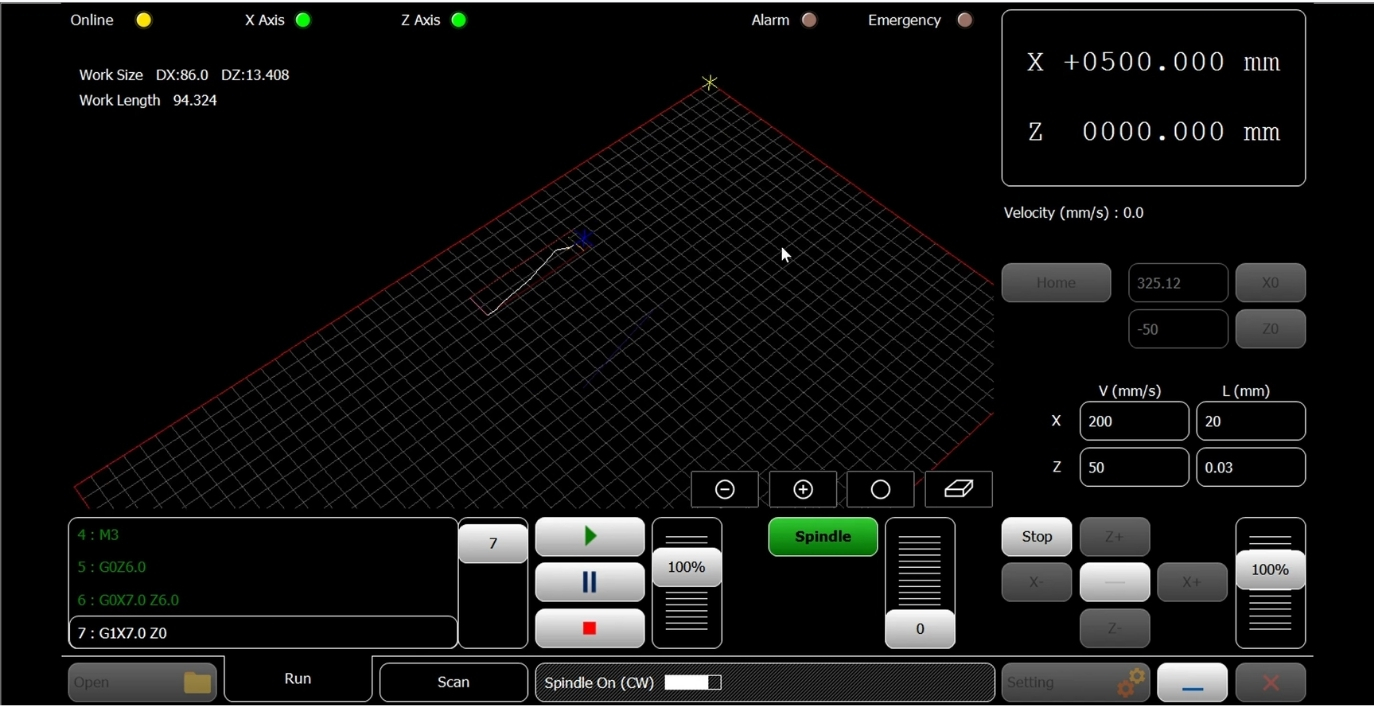
Fast origin tools (Home, X0, Z0) and per-axis jog (X±, Z±) for quick alignment.
Control & I/O
Spindle start/stop with speed ramp (Start/End RPM); on-screen Speed 100% override.
Inputs for SurfaceDetector, Home pins (X,Z), limits, door/guard, and E-stop.
Outputs for coolant/air as needed; Run / Pause / Stop with safe resume.
03
Software workflow
Software & Workflow
- 01Home X & Z
set X0/Z0, and mount the wheel.
- 02Scan
Choose Scan or Open a DXF profile; verify the preview on the grid.
- 03Depth
Set Depth, DepthStep, Feed, Overlap/PenUp, and spindle RPM.
- 04Dry-run
if needed, then Run; adjust with the Speed override.
- 05Save report
Inspect, repeat light passes if required, Save report.
04
Interface capabilities
Key Features of Radonix CNC Software
Software & Workflow
Scan mode: touch off the wheel, press Scan—the interface samples the rim/profile at a set ScanVelocity, applies SensorDisplace offset, and builds a repair path automatically.
DXF mode: load a DXF ring/profile; preview on the grid and apply pass parameters.
Multi-pass repair with Depth & DepthStep (e.g., 0.05 mm), controlled Feed, optional Overlap, and PenUp retracts at transitions.
Smoothing and Junction factors trim chatter at corners; per-axis V (mm/s) and L (mm) steps for tuning.
Live Absolute/Relative readouts, feed override, and Spindle panel for RPM control.
Key Capabilities (at a glance)
Scan-to-path wheel repair (no CAD required)
DXF profile import with grid preview
Multi-pass depth control (Depth/DepthStep)
Smoothing, junction tuning, and overlap control
Spindle speed ramp (Start/End) with override
Surface detector/probe offset (SensorDisplace)
Safe Pause/Resume, job logs, and alarms
05
Technical reference
Typical Specifications
| Area | Spec |
|---|---|
| Axes / Modes | X, Z linear with rotating spindle |
| Inputs | Surface detector, Home/Limit (X,Z), door/guard, E-stop |
| Pass Control | Depth, DepthStep, Feed, Overlap, PenUp |
| Scan | ScanVelocity, SensorDisplace offset |
| Spindle | RPM start/end ramp, on-screen override |
| ToolPath | Acceleration, TraverseVelocity, Smoothness, JunctionFactor |
| Reports | Run time, passes, alarms/stops, operator notes |
06
Operating evidence
Videos & Demos
Real-world clips of Radonix interfaces on production machines—setup, operation, quality tips, and quick troubleshooting.
07
Compatible hardware