

Radonix interface
2-Axis Wood-Turning CNC Controller for CNC Lathes
Smooth, accurate turning of balusters, columns, knobs, and custom profiles from DXF or templates—with guided setup, clean rough/finish passes, and safe spindle control.
- Axes
- 2-Axis
- Machine class
- Two-axis CNC wood lathes and turning machines
- Input
- DXF profiles (revolve), standard G-code, built-in bead/cove/taper templates
- Controllers
- PC Smart 4APC Smart 3ASPC-Pro LAN 4A
01
Interface profile
Introduction
With CAM-Pro and compatible Radonix controller hardware, the XZ CNC controller interface is designed for two-axis wood lathes producing balusters, columns and turned profiles.
- Who uses it
- Furniture and millwork shops, stair & railing makers, architectural décor, instrument and craft manufacturers, OEM woodworking lines.
- Works with
- 2-axis CNC wood lathes with a powered spindle (VFD) and linear X (radial) / Z (along bed) slides, single toolpost or dual tools.
- Compatible controllers
- PC Smart 4APC Smart 3ASPC-Pro LAN 4A
- Supported files
02
Machine architecture
Machine & Kinematics
Machine & Kinematics
X–Z slides track along a rotating workpiece; configurable work envelope, homing and soft limits for repeatable setups.
Supports chuck + tailstock (live center) with prompts; optional steady rest / follower support.
Fast origin tools (Home, X0, Z0) and per-axis jog (X±, Z±) for quick alignment to a hard stop or part face.
Control & I/O
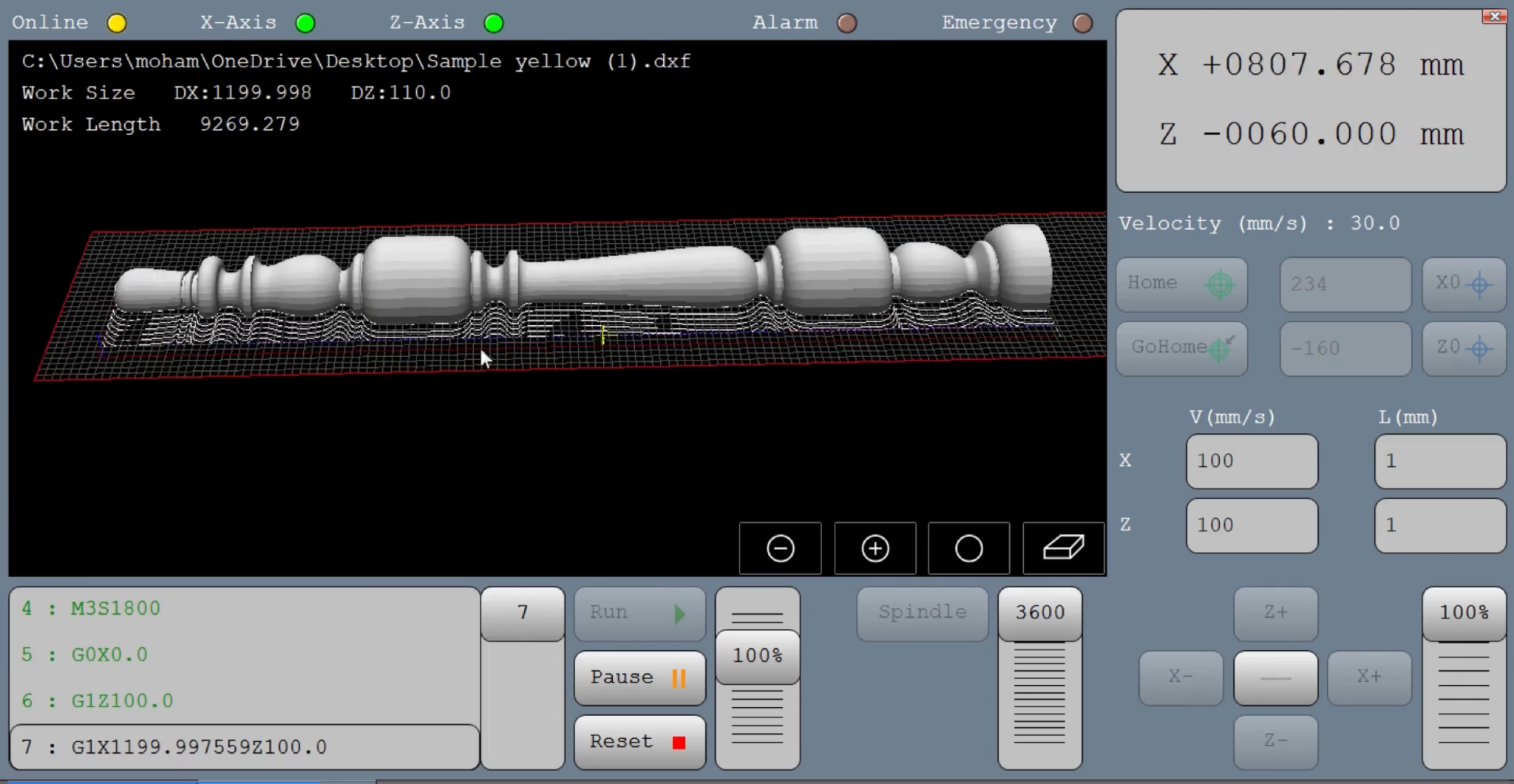
Big grid preview with red work boundary and live crosshair.
Absolute X/Z position boxes and Velocity (mm/s) display.
Home / GoHome buttons; numeric X0 / Z0 setters for zeroing.
V (mm/s) per-axis feed boxes and L (mm) step boxes for jog/increment moves.
Run / Pause ⏸ / Reset ⬛ controls and Speed 100% override slider.
Spindle panel with RPM setpoint (e.g., 3600) and ramp via slider.
E-stop chain and axis status indicators (X/Z LEDs).
03
Software workflow
Software & Workflow
- 01Home X & Z
set X0/Z0.
- 02Open
DXF/G-code; verify preview.
- 03V
Set feeds (V) and steps (L); set spindle RPM.
- 04Run
adjust with Speed %; use Pause/Reset for checks.
- 05Step 5
Save notes/time for repeat jobs.
04
Interface capabilities
Key Features of Radonix CNC Software
Software & Workflow
Open your DXF/G-code and preview the revolved path on the grid.
Use V (mm/s) and L (mm) to set feed and step increments; set X0/Z0 directly from the right-hand panel.
Start the Spindle, then Run; adjust with the Speed % override.
Pause/Resume safely at any time; Reset returns control for re-zero or tool checks.
Status bar shows operation states (e.g., Home Done Z,X).
Key Capabilities (at a glance)
DXF profile import (revolved) with on-screen preview
Simple, operator-friendly zeroing and jog with numeric steps
Spindle RPM setpoint with real-time override
Safe Run/Pause/Reset, Home/GoHome, and soft-limit handling
Job logging (time, stops/alarms, notes) for repeatability
Direct DXF Execution
Seamlessly load and execute DXF files without the need for G-code conversion — streamlining your workflow and reducing setup time.
Smart Component & Path Management
Select specific parts from complex drawings and customize cutting order with intuitive control over toolpath sequencing.
Interactive On-Screen Editing
Scale, rotate, and mirror parts directly within the interface — with live toolpath previews to ensure precision.
Flexible Part Placement
Manually drag and drop parts onto your material sheet to accommodate irregular shapes, pre-cut stock, or remnant reuse.
Advanced Pause Controls
Set up to three independent pause points — before the cut, during the cut, and after the cut — for manual checks or operational adjustments.
Reverse Cutting Mode
Execute toolpaths in reverse to minimize material warping or adjust final exit points based on design needs.
Simulation / Demo Run Mode
Perform a complete dry-run motion test with the spindle disabled to verify the turning path and machine travel.
Display of the final workpiece in three dimensions.
Real-time 3D view of the revolved part so operators can confirm shape and dimensions—and spot issues—before cutting.
Ability to select the loading direction in the forward, backward, or both directions.
Choose forward, backward, or both (zig-zag) passes to match your setup and optimize cycle time and finish.
05
Technical reference
Typical Specifications
| Area | Spec |
|---|---|
| Axes | X radial, Z axial |
| Files | DXF (revolved), G-code |
| Feeds | Per-axis V (mm/s); override slider |
| Jog/Step | L (mm) increments, X± / Z± keys |
| Spindle | VFD run/stop, RPM setpoint & ramp |
| Safety | Home/limit pins, door/guard, E-stop |
| Settings | G54 reference, feed/jog steps, max feeds, keep-location |
06
Operating evidence
Videos & Demos
Real-world clips of Radonix interfaces on production machines—setup, operation, quality tips, and quick troubleshooting.
07
Compatible hardware