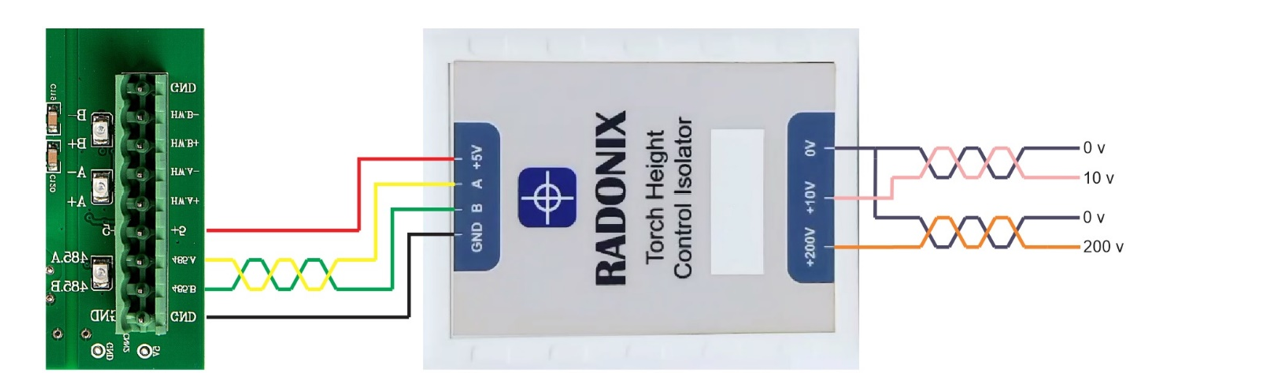
Radonix interface
3-Axis Plasma CNC Controller with Torch Height Control
Three-axis plate cutting with arc-voltage Torch Height Control (THC) for consistent standoff on thin or uneven sheets—kerf-accurate paths, clean leads, and safe, guided operation.
- Axes
- 3-Axis
- Machine class
- Three-axis plasma cutting machines with arc-voltage THC
- Input
- DXF and standard G-code (e.g., ArtCAM / PowerMill posts)
- Controllers
- PC Smart 4APC Smart 3ASPC-Pro LAN 4A
01
Interface profile
Introduction
With CAM-Pro and compatible Radonix controller hardware, the three-axis plasma CNC controller interface combines X-Y cutting motion, Z control and arc-voltage Torch Height Control.
- Who uses it
- Fabrication & job shops · HVAC/ducting · metal service centers · thin-sheet and long-cut production lines.
- Works with
- 3-axes Gantry tables with X-Y motion and Z lifter driven by stepper/servo.
- Compatible controllers
- PC Smart 4APC Smart 3ASPC-Pro LAN 4A
- Supported files
- DXF and standard G-code (e.g., ArtCAM / PowerMill posts)
- Important
- This interface does include Torch Height Control (THC).
02
Machine architecture
Machine & Kinematics
Machine & Kinematics
XY gantry + Z lifter with homing and soft limits; presets for Pierce Height / Cut Height / Retract.
Designed for live arc-voltage Z regulation to hold target standoff on wavy or heat-warped material.
Supports magnetic breakaway, touch sensor, sheet alignment tools, and full E-stop chain.
Control & I/O
I/O for Torch On/Off, gas Pre/Post-flow, alarms/beacons, guards/doors, pressure/flow OK.
THC loop drives Z (pulse/dir) to the TorchValue target using THCGain and Tolerance (deadband), with THCThreshold, StartAfter, and EndBefore to prevent dive.
Manual Z trim hotkeys, Speed % override, Pause/Resume, and safe recovery.
Inputs mapped for HomePin X/Y/Z, P-TorchSensorPin (ohmic/mech touch), P-AntiCollisionSensorPin, and Emergency.
03
Software workflow
Software & Workflow

- 01Home X/Y/Z
set X0/Y0; verify SafeZ and touch sensor.
- 02Open
DXF/G-code; confirm kerf, leads, pierce/cut heights.
- 03Enabled
Set THC: Enabled, TorchValue (or AutoTorchValue), THCGain, Tolerance, THCThreshold, StartAfter, EndBefore; set CutVelocity and pierce timing.
- 04Dry-run
(torch off), check clamps and inner→outer order.
- 05Run
THC regulates standoff; trim Z manually if needed; Pause/Resume safely.
- 06run report
Review and save the run report.
04
Interface capabilities
Key Features of Radonix CNC Software
Software & Workflow
DXF/G-code import with grid preview and automatic kerf/offset.
Lead-in/lead-out (arc/radial/tangent), Pierce dwell, auto retract, micro-tabs, and corner slow-down.
Ordering rules (inner→outer), clamp keep-outs, and dry-run (torch off).
Per-job Plasma settings: CutVelocity, CutTime/PreCutTime (with TimeUnit = ms), optional SheetAlignBaseAxis.
Pipe work supported via PipeCut mode (uses Diameter).
Key Capabilities (at a glance)
Closed-loop THC with Target V, Gain/Deadband, Anti-dive & Corner Hold
Kerf-accurate DXF/G-code, clean leads, micro-tabs, inner→outer sequencing
Manual Z trim while cutting, Speed % override, safe Pause/Resume
Touch-off with offset, auto retract to SafeZ, collision sensing
Job logging: time, cut length, pierces, pauses/alarms, notes
Direct DXF Execution
Seamlessly load and execute DXF files without the need for G-code conversion — streamlining your workflow and reducing setup time.
Smart Component & Path Management
Select specific parts from complex drawings and customize cutting order with intuitive control over toolpath sequencing.
Interactive On-Screen Editing
Scale, rotate, and mirror parts directly within the interface — with live toolpath previews to ensure precision.
Flexible Part Placement
Manually drag and drop parts onto your material sheet to accommodate irregular shapes, pre-cut stock, or remnant reuse.
Advanced Pause Controls
Set up to three independent pause points — before the cut, during the cut, and after the cut — for manual checks or operational adjustments.
Reverse Cutting Mode
Execute toolpaths in reverse to minimize material warping or adjust final exit points based on design needs.
Simulation / Demo Run Mode
Perform a complete motion test without activating the torch. Ideal for verifying the toolpath before live cutting.
Cylindrical Cutting Capability
Project flat designs onto cylindrical surfaces for precision tube and pipe cutting operations.
Live Arc-Voltage Monitoring
Real-time arc-voltage feedback ensures dynamic Z-axis height control — maintaining optimal torch-to-material distance during operation.
05
Technical reference
Typical Specifications
| Area | Spec |
|---|---|
| Axes | X, Y, Z (stepper/servo) with THC |
| Files | DXF, standard G-code |
| THC | TorchValue, THCGain, Tolerance, THCThreshold, StartAfter, EndBefore, AlwaysTouch, TouchSensorOffset |
| Heights | Pierce / Cut / Retract: SafeZ & SafeZVelocity |
| Timing | CutTime, PreCutTime (TimeUnit = ms) |
| I/O | Torch/gases, arc-OK, touch sensor, anti-collision, guards/E-stop |
| Reports | Time, cut length, pierces, pauses/alarms, notes |
06
Operating evidence
Videos & Demos
Real-world clips of Radonix interfaces on production machines—setup, operation, quality tips, and quick troubleshooting.
07
Compatible hardware