Author: Nima Rad
Comparing the Radonix CNC Controller with DSP RichAuto
Table of Contents
- Comparing Motion Quality
- Comparing Control Architecture
- Comparing User Environment Simplicity
- Comparing Information Display and Toolpath
- Comparing Installation and Commissioning
- Comparing Documentation
- Comparing Machine Development Capability
- Comparing Suitability for the Operator
- Summary Comparison Table: Radonix vs RichAuto DSP
- The Real Advantages of RichAuto DSP
- Where Does DSP’s Main Limitation Lie?
- What Is Radonix’s Main Advantage Over DSP?
- Which Controller Suits Which Application?
- Summary
Introduction
A Radonix vs DSP comparison matters a great deal on many CNC router machines, especially wood, stone, sign-making, and engraving machines, since two very different types of control systems are used on them: PC-based controllers like Radonix, and standalone handheld or DSP controllers like RichAuto.
RichAuto controllers, usually known in the market as DSP controllers, have been used for years on many 3- and 4-axis routers thanks to their affordable price, no permanent need for a computer, and relatively simple structure.
Radonix, by contrast, is a CNC system made up of a CNC controller, Radonix CAM-Pro, a machine-specific interface, calibration and test tools, a configuration environment, and an interface editor.
So the difference between these two systems isn’t just in the controller’s appearance — it really comes down to two different philosophies of CNC control. In this article, as part of a Radonix vs DSP comparison, the two systems are compared across their main technical and practical aspects.
1. Comparing Motion Quality
What is motion quality in CNC? One of a CNC controller’s most important jobs is converting the path defined in G-code into coordinated axis motion.
Motion quality doesn’t depend on pulse output count alone. Factors such as interpolation, trajectory planning, acceleration, deceleration, speed profile, jerk, buffering, axis coordination, corner handling, running short blocks in sequence, and speed changes along the path all affect the final motion quality.
This matters especially on paths made up of a large number of segments — for example, in engraving, relief work, molds, curved paths, 3D files, and high-speed contour cutting, weak motion planning can reduce motion smoothness or slow the machine down.
Motion quality on Radonix On Radonix, motion control is handled by a dedicated hardware controller. For example, the PC-Smart 4A has specs such as 4 independent interpolated axes, an S-curve speed profile, hardware FIFO with a 2000-block capacity, and a pulse rate up to 500,000 pulses/sec per axis.
Having an S-curve matters a great deal for motion quality. On a simple speed profile, acceleration changes can transfer to the mechanical system more sharply, but the S-curve makes speed and acceleration changes smoother. This can lead to smoother machine motion, less mechanical shock, less stress on the ball screw, less stress on the rack and pinion, less shock to the motor and drive, and better performance at high acceleration.
The hardware FIFO also allows a set of motion blocks to be stored in the controller, so motion execution depends less on Windows’ real-time scheduling.
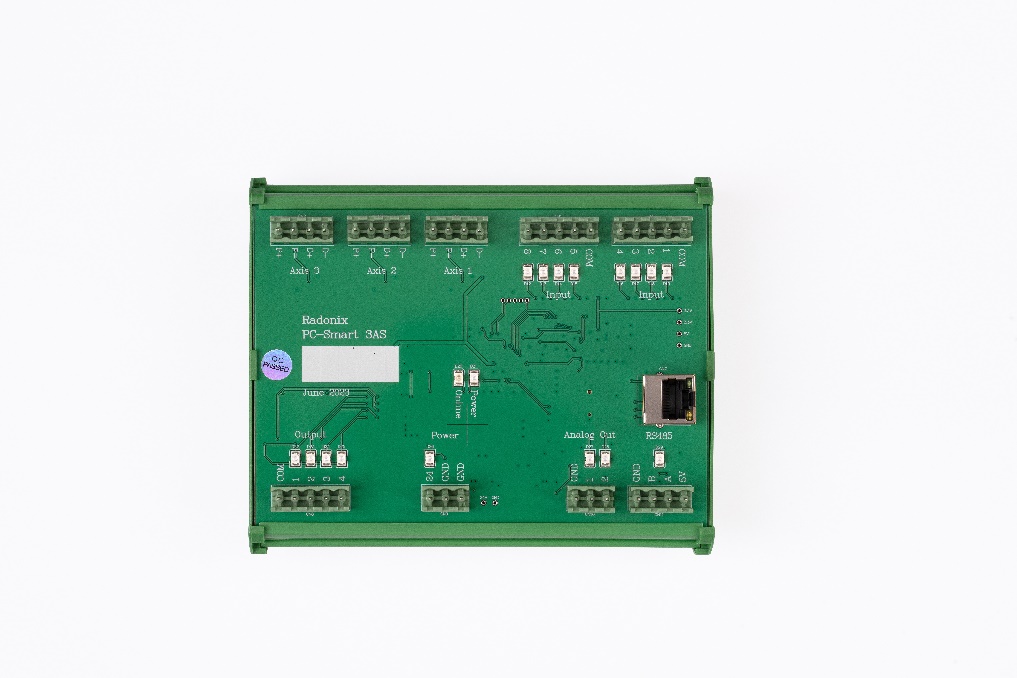
Radonix PC-Smart 3AS controller
Motion quality on RichAuto DSP RichAuto is also a genuine motion controller and runs axis motion independently of the PC. On models such as the A18, features like line interpolation, arc interpolation, curve interpolation, and 4-axis linkage are available.
For some models such as the A18, a maximum pulse frequency of 1M pulses/sec is even stated. So going by the raw pulse frequency number alone, DSP shouldn’t necessarily be assumed weaker — on some models, the stated figure is even higher than some Radonix controllers. But pulse frequency alone doesn’t represent motion quality.
In the general specifications of the RichAuto models reviewed, the focus is mostly on line/arc/curve interpolation, breakpoint, manual motion, and feed adjustment, and details about motion profile and buffer architecture aren’t described with the same depth published for some Radonix controllers.
Comparison result for motion quality RichAuto can create suitable, acceptable motion for typical routers and has high pulse rate capability on some models. But Radonix, with its clearly stated motion architecture including interpolation + S-curve + hardware FIFO, allows more precise control and engineering of the machine’s dynamic behavior.
For machines with high acceleration, complex paths, a high priority on motion quality, or that will be produced industrially in series, Radonix’s structure is more complete and predictable.
Overall advantage in motion architecture and engineering quality: Radonix
2. Comparing Control Architecture
RichAuto DSP architecture DSP’s most important feature is that it’s a standalone system. Its typical structure is: USB flash → DSP handheld controller → interface board → servo/stepper drive → motor.
On the A11, the system itself consists of the handheld controller, an interface board, a 50-pin cable, and a USB communication cable.
Radonix architecture Radonix’s structure is: PC → CAM-Pro → Ethernet/LAN → Radonix controller → servo/stepper drive. The PC handles the operator environment, path display, settings, and process management, while motion is executed by the controller.
Comparison result For a simple router, RichAuto’s independence is an advantage. But removing the PC also means removing the capabilities a software-based environment can provide. By keeping a hardware motion controller, Radonix also gives the machine the capabilities of a PC-based CNC.
Standalone simplicity: RichAuto Architecture and control-feature completeness: Radonix
3. Comparing User Environment Simplicity
The importance of the user interface A CNC operator needs to be able to easily select a file, jog an axis, set zero, start a program, view machine status, and identify errors. But a simple router doesn’t need the same type of interface as a complex industrial machine.
RichAuto’s user environment One of DSP’s strengths is its simplicity. For example, the A11 has an LCD with a resolution of 128×64, a physical keypad, and 16 operating keys.
The operator can directly jog, set the origin, select a file, start/pause/stop, and adjust feed straight from the handheld. So for a simple router, DSP’s user environment is fast and simple, but the small screen limits how much information can be shown at once.
Radonix’s user environment Radonix CAM-Pro uses dedicated interfaces for different machines. Instead of one fixed screen for every machine, the interface can be designed to match the machine’s process.
For example, on a router, Start, Pause, Stop, Home, Jog, Spindle, Vacuum, and Tool Change can be placed on the main screen. On a plasma machine, Torch, THC, Arc OK, Pierce Height, and Cut Height can be shown, and on a glass machine, Loader, Align, Vacuum, Cutting, and Break.
Comparison result for the user environment For a very simple router, DSP has a simple environment due to its small number of options, but DSP’s simplicity is largely a result of its limited display. Radonix allows a large, graphical, yet still simple interface to be designed exactly around the machine.
For a simple router with limited operations: RichAuto is simple. For building a simple, professional, dedicated HMI for an industrial machine: Radonix has the advantage.
4. Comparing Information Display and Toolpath
The importance of information display On a CNC machine, viewing information such as axis position, G-code, toolpath, input status, output status, speed, feed, alarms, and machine status helps the operator and technician a great deal.
RichAuto On common models such as the A11, information is shown on a small LCD. This display is suitable for coordinates, menus, parameters, file name, and machine status, but its capacity for graphical information display is limited. Newer models such as the B58 have a larger color screen, but the handheld system’s structure remains the same.
Radonix CAM-Pro runs on a PC. As a result, toolpath, G-code, coordinates, machine status, input/output, parameters, and various interface screens can all be shown in a much larger space. Simulation Mode also allows viewing and testing G-code and machine behavior without a full hardware connection.
Comparison result In visualization and monitoring, the difference between the two systems is very noticeable.
Advantage in information display and graphical control: Radonix
5. Comparing Installation and Commissioning
Installation and commissioning Setting up a CNC involves defining the axes, pulse equivalent, direction, acceleration, speed, home, limit, I/O, spindle, and calibration.
RichAuto installation One of DSP’s advantages is a fairly simple setup for a standard router. The user connects the interface board, wires the drives, enters the pulse equivalent, sets the table size, configures home and spindle, and the machine is ready to run. The A11’s documentation also explains these steps in its machine setup section. For a standard 3-axis machine, this method is very simple.
Radonix installation Radonix gives the machine builder more steps to work through, but also provides dedicated tools for them. After installing CAM-Pro, the user gets access to CAM-Pro, CAM-Pro Calibrator, and CAM-Pro Test. Inputs and outputs can also be defined and tested from within Settings. Simulation Mode also allows part of the process to be tested before the hardware is fully connected.
Comparison result If the goal is quickly setting up a standard 3-axis router, RichAuto is very simple. But if “simplicity” means professional commissioning that includes calibration, I/O testing, simulation, troubleshooting, and machine development, Radonix gives the machine builder much more complete tools.
Advantage for simple router setup: RichAuto Advantage for professional commissioning and machine building: Radonix
6. Comparing Documentation
RichAuto RichAuto isn’t short on documentation. For example, the A11’s manual runs about 68 pages and covers topics such as system composition, wiring, machine setup, file import, operation, breakpoint, power failure, and troubleshooting. Separate wiring diagrams and manuals also exist for different models.
Radonix Beyond hardware documentation, Radonix offers separate, extensive documentation for the controller, CAM-Pro, installation, calibration, input, output, simulation, interface, interface elements, functions, parameters, and interface editing. As a result, the documentation doesn’t just explain how to use the controller — it also documents how to develop the interface and the machine’s behavior.
Comparison result RichAuto has acceptable documentation for installing and using the device. But Radonix takes documentation beyond an operation manual, covering hardware, software, configuration, and interface development in one collection.
Advantage in documentation breadth and depth: Radonix
7. Comparing Software Appearance Editing Capability
This is one of the biggest differences between the two systems.
RichAuto On RichAuto’s common handheld controllers, the screen layout and main keys are set by the controller’s manufacturer. The user can adjust parameters, I/O, and some functions, but on models such as the A11 and A18, there’s no environment like a visual HMI editor for freely designing the operator screen. For example, the A18 has user-definable I/O, but that’s different from freely designing the HMI.
Radonix CAM-Pro has an Interface Editing Environment. The machine builder can add elements, remove elements, change properties, define connections, link parameters, link functions, and change the interface to match the machine. Even visual properties such as background, font, font size, font style, foreground color, border, and images can be adjusted.
Comparison result On RichAuto, the operator uses an HMI designed by the controller’s manufacturer. On Radonix, the machine builder can design the machine’s own HMI. This is a very significant advantage for a machine-building company.
Clear advantage: Radonix
8. Comparing Machine Development Capability
RichAuto RichAuto is very well suited to specific applications. For example, the F131 model is designed for 3 axes and applications such as woodworking, stone, advertising, and engraving. The A18 also has suitable capabilities for 4 axes and rotary applications. But its handheld structure makes developing the machine for very specific processes more limited.
Radonix Radonix has different interfaces for router, plasma, laser, waterjet, glass, wire cutting, hot wire, and engraving applications. Interfaces for 2 to 6 axes are also available, along with the option to request a dedicated interface. So a machine builder can use the controller across different projects.
Comparison result RichAuto is very well suited to standard machines. Radonix has much more flexibility for developing specialized, special-purpose machines.
Advantage: Radonix
9. Comparing Axis Count
RichAuto The RichAuto family has different models. For example, the A11 is a common 3-axis system, the A18 is a 4-axis linkage system, and the B58 is 4-axis. So DSP shouldn’t be considered strictly 3-axis.
Radonix CAM-Pro and the Radonix controller family are used across various configurations up to 6 axes.
Comparison result For a 3- or 4-axis router, both families have options. But for higher-end systems and more complex machines, Radonix’s range is broader.
Advantage in axis scalability: Radonix
10. Comparing Input and Output
RichAuto The I/O count on RichAuto depends on the model. For example, the A18 has 8I/8O. The F131 has 16 inputs/8 outputs. So different models have different capacity.
Radonix The PC-Smart 4A has 16 digital inputs, 8 digital outputs, 2 analog inputs, and 2 analog outputs.
Comparison result On digital I/O, comparisons need to be made model by model, and no absolute winner can be declared. But on models such as the Smart 4A, having analog I/O alongside digital I/O creates more capability for process control.
Advantage in I/O variety on the compared model: Radonix
11. Comparing Analog Control
The importance of analog On industrial machines, analog signals can be used for spindle speed, pressure, sensors, actuators, and process control.
RichAuto On common router DSPs, spindle control is usually done through the interface board and defining a grade or inverter-related commands. For example, the A11/A18 have spindle control and speed-level adjustment capabilities.
Radonix The PC-Smart 4A has 2 analog outputs (0–10V) and 2 analog inputs (0–10V). So analog isn’t only used for output commands — receiving analog signals is also possible.
Comparison result For a simple spindle, both systems have a solution. But for broader process control and using analog sensors/actuators, Radonix offers more flexible capabilities.
Advantage: Radonix
12. Comparing File Transfer and Management
RichAuto One of DSP’s genuine strengths is working offline. The user can put a file on a USB flash drive and load it directly into the controller. The A11 uses a USB stick for file transfer. This method is simple, fast, and independent of a PC.
Radonix On Radonix, files are managed on the PC, and CAM-Pro provides a more complete environment for selecting files, viewing G-code, toolpaths, simulation, and process management.
Comparison result For grabbing a file from the design office and running it directly, USB flash on RichAuto is very simple. But for managing, reviewing, and closely examining the process, Radonix offers more capability.
13. Comparing Behavior During a Power Outage
RichAuto One of RichAuto’s important advantages is breakpoint resume and power failure recovery. This capability is offered on the A11, A18, and other models in the DSP family. This feature is especially useful on long router files.
Radonix Radonix also handles process and file control through CAM-Pro, but when comparing, it should be noted that power failure resume capability needs to be checked based on the interface and process being used, and the same claim shouldn’t be made without checking the specific model and interface.
Comparison result In this area, RichAuto has a clear, practical capability that should be recognized as one of its strengths.
RichAuto’s clear advantage: Power Failure / Breakpoint Recovery
14. Comparing Troubleshooting
RichAuto On DSP, inputs and outputs can be tested and system settings checked through the menu. The hardware’s simplicity also means fewer components are involved on a simple router.
Radonix On Radonix, besides the main interface, CAM-Pro Test is available for testing the controller. Inputs and outputs can also be viewed and configured from within the software. Simulation Mode can also be used to check logic and machine behavior without a full hardware connection.
Comparison result For a simple router, DSP’s simplicity makes troubleshooting easy. But for a complex machine, Radonix’s software diagnostics tools give the technician far more information.
Advantage in professional troubleshooting: Radonix
15. Comparing Standardization and Series Production
If a machine builder produces one standard router, RichAuto is a simple, well-known option. But if that same company produces various products such as routers, plasma machines, glass, waterjet, profile cutting, and special-purpose machines, using one handheld DSP for all these applications creates limitations.
Radonix allows a suitable controller, dedicated interface, specific functions, I/O configuration, and dedicated operator screens to be defined for each machine. So a machine builder can develop a single platform across several product families.
Advantage for OEM and product platforms: Radonix
16. Comparing After-Sales Service
On RichAuto, a significant part of the settings are handled through the handheld’s menus. If the machine is simple, this is an advantage, but for checking complex processes, the small screen offers limited information.
On Radonix, a technician can check inputs, outputs, parameters, the interface, toolpaths, calibration, and controller status on a computer. Documentation also exists for these areas. For a machine-building company with many machines in the field, this can reduce support cost and time.
Advantage for after-sales service on complex machines: Radonix
17. Comparing Suitability for the Operator
RichAuto For an operator whose job is only loading a file, setting the origin, and starting/stopping, RichAuto is very simple.
Radonix On Radonix, the interface can also be designed just as simply. But when needed, more capabilities such as a toolpath view, alarms, automatic processes, tool change, vacuum, sensors, and machine status can be added to the same environment. So Radonix provides simplicity without forcing a limit on capability.
Advantage in designing a simple yet expandable UI: Radonix
18. Summary Comparison Table: Radonix vs RichAuto DSP
| Criterion | Radonix | RichAuto DSP | Result |
| Motion quality | S-curve + interpolation + hardware FIFO on the reviewed model | Suitable interpolation, models up to 1M pulses/s | Radonix on motion architecture |
| Independence from a PC | A PC is required | Standalone | RichAuto |
| Operator environment | Graphical, dedicated HMI | Simple handheld | Radonix for professional machines |
| Simplicity for a typical router | Suitable | Very simple | RichAuto |
| Professional commissioning | Calibrator + Test + Simulation | Menu-based setup | Radonix |
| Documentation | Hardware + software + interface | Complete manual and wiring docs | Radonix on breadth |
| Interface editor | Available | No comparable visual editor | Radonix |
| Toolpath display | PC environment and visualization | Limited on common handheld models | Radonix |
| Number of axes | Up to 6 axes across the system family | Various common 3- and 4-axis models | Radonix |
| Digital I/O | Depends on model | Depends on model | Model by model |
| Analog I/O | 0–10V input/output on some models | Depends on model/structure | Radonix on the compared model |
| USB offline | File via PC | Very simple with a USB stick | RichAuto |
| Power failure resume | Depends on process/interface | Clear capability on common models | RichAuto |
| Special-purpose machines | Very flexible | More limited | Radonix |
| Multi-family machine production | Very suitable | Better suited to specific applications | Radonix |
| Professional troubleshooting | Extensive software diagnostics | Menu and I/O test | Radonix |
| Custom HMI | Very extensive | Limited | Radonix |
| Economical router | Usable | Very suitable | RichAuto |
| Expandable industrial machine | Very suitable | Usable for specific applications | Radonix |
19. The Real Advantages of RichAuto DSP
For the comparison to be fair and technical, RichAuto’s strengths need to be acknowledged too. DSP’s most important advantages include:
- No permanent need for a PC
- Simple structure
- Handheld controller
- Suitable setup for standard routers
- Simple file transfer via USB flash
- Breakpoint resume and power failure recovery
- Affordable cost
- Widespread use on economical routers
- Direct control from the handheld
- Availability of 3- and 4-axis models
- High pulse rate on some models
So DSP shouldn’t be considered a weak controller. For the purpose it was designed for — a fairly standard router — it can be a very suitable solution.
20. Where Does DSP’s Main Limitation Lie?
RichAuto’s main limitation shows up once the machine goes beyond a simple router. Suppose the machine has a complex tool changer, a large number of sensors, a pneumatic system, an automatic loader, several processes, analog sensors, multiple operator screens, an automatic process, and dedicated logic.
At that point, simple X, Y, and Z motion isn’t enough anymore. The control system needs to be able to manage and display the machine’s entire behavior for the operator. Under such conditions, the handheld structure becomes more limited.
21. What Is Radonix’s Main Advantage Over DSP?
The biggest difference between Radonix and DSP isn’t in a single spec like pulse rate. The real difference is at the level of the control platform.
RichAuto is mostly a standalone motion controller, while Radonix is a machine control platform — meaning that besides motion, it also gives the machine builder HMI, I/O, simulation, calibration, diagnostics, machine interface, visual editing, and process control.
22. Which Controller Suits Which Application?
RichAuto DSP is a suitable choice for:
- A simple CNC router
- An economical wood CNC
- Engraving
- A standard 3-axis machine
- A machine where a PC isn’t desirable
- A machine where the operator only performs basic operations
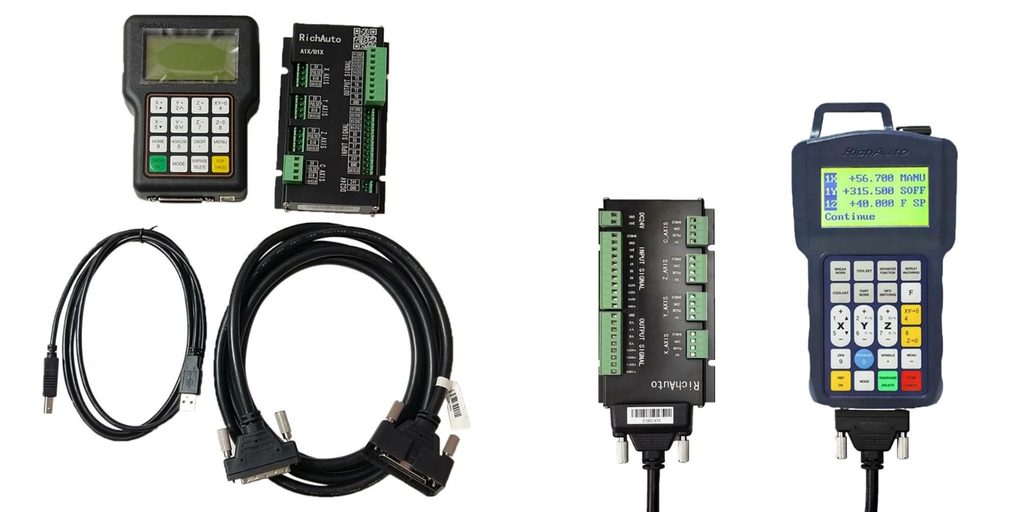
RichAuto A18 4-axis controller with handheld and interface board
Radonix is a more suitable choice for:
- An industrial CNC router
- An ATC router
- Plasma
- Glass cutting
- Waterjet
- Stone CNC
- Profile cutting
- 4-, 5-, and 6-axis machines
- A machine with a lot of I/O
- A system with analog processes
- A special-purpose machine
- A machine with automatic processes
- OEM and series production
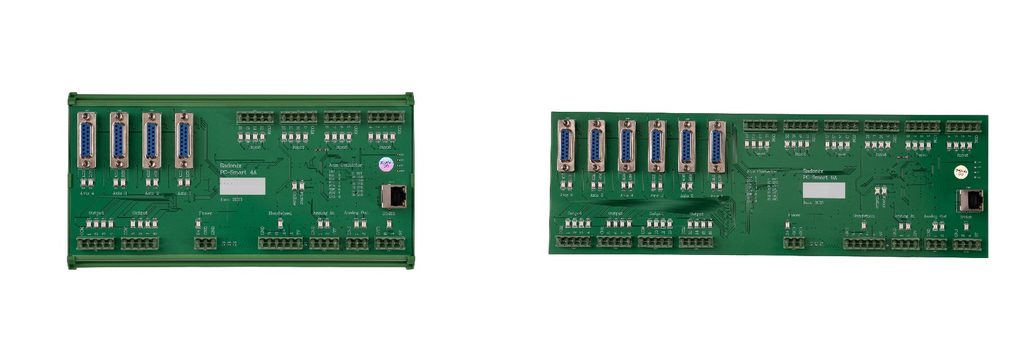
Radonix 4-axis and 6-axis controllers
Summary
RichAuto DSP is a simple, practical, successful controller for standard CNC routers. Its most important feature is that, without needing a PC, it can receive a file from USB, control the axes, set the origin, run G-code, manage feed and spindle, and resume work after a stop or power outage. For this reason, it’s a suitable choice for many economical routers.
But when “CNC control” means more than just 3- or 4-axis motion, the situation changes. A modern industrial machine needs, besides motion, a professional HMI, visualization, diagnostics, I/O management, analog control, simulation, interface customization, process development, documentation, and room to expand. Radonix offers these capabilities as one integrated hardware + software platform.
For this reason, the main difference can be put this way: RichAuto DSP is a suitable solution for controlling a standard CNC, while Radonix is a suitable platform for designing and controlling a complete CNC machine.
For a simple router where price, not needing a PC, and simplicity matter most, RichAuto can be a suitable choice. But if the goal is building a machine that’s industrial, professional, expandable, has a dedicated interface, can be produced in volume, and can be supported long-term, Radonix is the more complete, suitable choice.
For product evaluation, compare Radonix PC-based industrial CNC controllers, expansion hardware, software and machine-specific interfaces. Radonix industrial CNC controller range.