Company: Radonix Automation
Author: Nima Rad
Table of Contents
- Introduction
- What Is Nesting?
- How to Use ProNest
- Main Features of ProNest
- Management Features
- Different Versions of ProNest
- Advantages of Using ProNest
- Important Points When Using ProNest
- Summary
Introduction and Review of ProNest Software Features in CNC Machines
Introduction
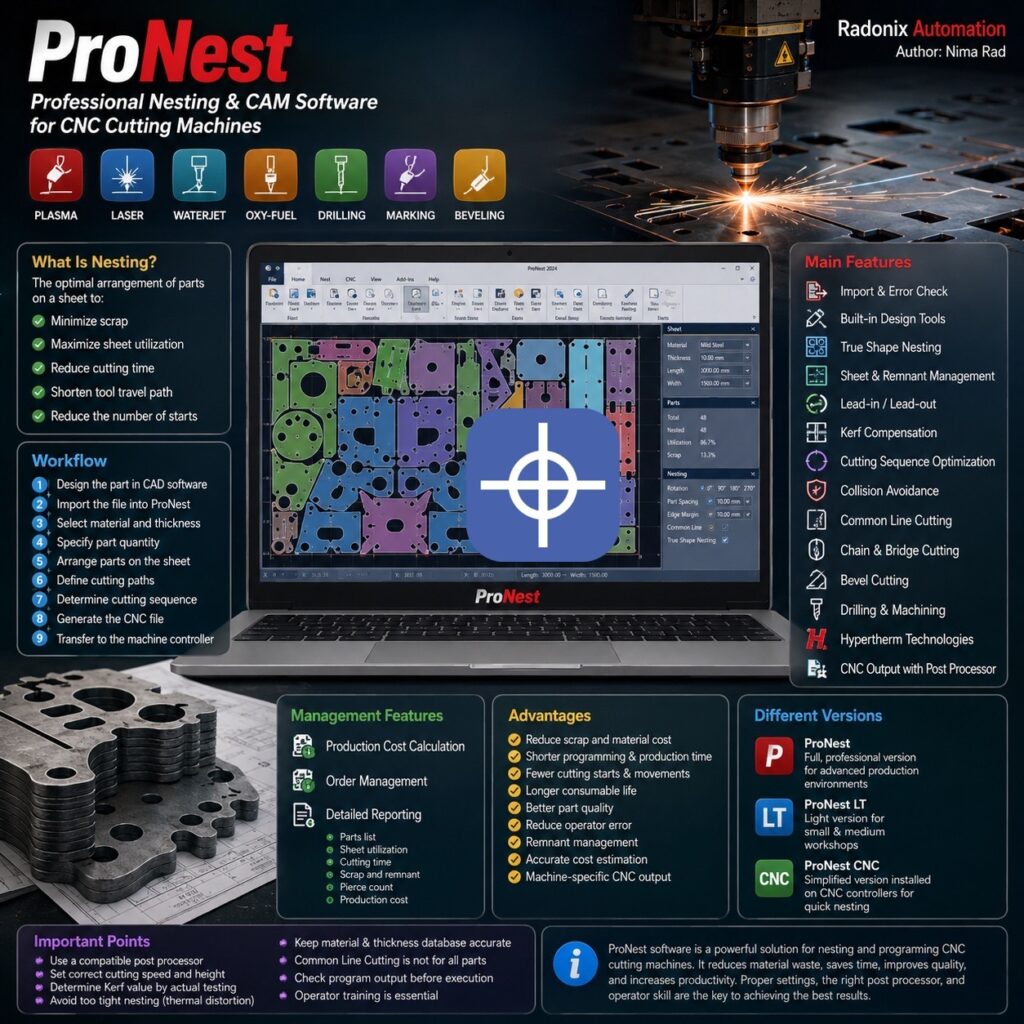
ProNest software is one of the professional CAD/CAM and nesting programs developed by Hypertherm and used for programming CNC cutting machines. ProNest software is designed for sheet-cutting machines that use the following technologies:
- Plasma cutting
- Laser cutting
- Waterjet
- Oxy-fuel cutting
- Drilling
- Marking
- Beveling
ProNest software is widely used in the metal industry, steel structures, machine manufacturing, automotive production, shipbuilding, oil and gas, and sheet-cutting workshops.
What Is Nesting?
Nesting refers to the optimal arrangement of parts on a sheet. The goal of nesting is to arrange parts on the sheet so that:
- The least amount of scrap is generated.
- The sheet surface is used to the greatest extent possible.
- Cutting time is reduced.
- The tool’s travel path is shortened.
- The number of cutting starts is reduced.
ProNest software can arrange parts either manually or automatically.
How to Use ProNest
The typical workflow for using ProNest software includes the following steps:
- Designing the part in CAD software
- Importing the file into ProNest
- Selecting the sheet material and thickness
- Specifying the number of parts
- Arranging the parts on the sheet
- Defining the cutting paths
- Determining the cutting sequence
- Generating the CNC file
- Transferring the file to the machine’s controller
ProNest software sits between the design software and the CNC controller, converting the design file into a program that the machine can execute.
Main Features of ProNest
1. Importing Design Files
ProNest software supports common design formats, including:
- DXF
- DWG
- DGN
- CAM
The software can identify and correct certain geometric errors, such as:
- Open lines
- Duplicate lines
- Incomplete profiles
- Overlapping lines
- Layering issues
Correcting these errors before generating the CNC program prevents part damage or the execution of an incorrect path.
2. Built-in Design Tools
ProNest software includes simple 2D design tools. Using these tools, you can:
- Draw lines and circles.
- Create holes.
- Remove unnecessary lines.
- Move or rotate parts.
- Modify the size and shape of a part.
- Mirror or rescale parts.
This means there is no need to return to the CAD software for simple modifications.
3. Automatic Part Nesting
One of the most important features of ProNest software is True Shape Nesting. In this method, the software examines the actual shape of the parts and places them in the most suitable position on the sheet. During nesting, the following can be specified:
- Distance between parts
- Distance from the sheet edge
- Part rotation angle
- Sheet rolling direction
- Required quantity of each part
- Order priority
- Clamp locations
- Restricted areas
This feature reduces scrap and increases sheet utilization.
4. Sheet and Remnant Management
ProNest software can record information about available sheets, such as:
- Sheet material
- Thickness
- Length and width
- Price
- Sheet number
- Remaining quantity
After cutting is complete, the usable portion of the sheet is saved as a Remnant for use in future projects. This feature plays an important role in reducing raw material costs.
5. Lead-in and Lead-out Settings
Lead-in is the tool’s entry path to the main cutting line, and Lead-out is the tool’s exit path from the part. An improperly placed tool entry point can cause burning, dents, or damage to the part’s edge. In ProNest software, the following can be adjusted:
- Entry path length
- Entry angle
- Straight or arc-shaped path type
- Cutting start and end points
6. Kerf Compensation
During cutting, a certain amount of the sheet is removed by plasma, laser, or waterjet. The width of this removed section is called Kerf. ProNest software adjusts the tool path according to the Kerf value so that the final part dimensions match the drawing. The Kerf value depends on factors such as sheet material, thickness, speed, amperage, and nozzle type.
7. Determining Cutting Sequence
ProNest software can optimize the execution order of the paths. Typically, holes and internal sections are cut first, followed by the outer perimeter of the part. A correct cutting sequence ensures that:
- The part does not shift.
- Heat is not concentrated at a single point.
- Part quality improves.
- The likelihood of torch collision decreases.
8. Preventing Torch Collisions
In some cases, parts lift off the sheet surface after cutting. ProNest software can adjust the torch’s travel path so that it does not pass over already-cut parts. This feature reduces the risk of damage to the torch, nozzle, part, and the height control system.
9. Common Line Cutting
In the Common Line Cutting method, two parts share a common edge, and that line is cut only once. The advantages of this method include:
- Reduced cutting path length
- Fewer arc starts
- Lower gas consumption
- Lower torch consumable usage
- Increased production speed
- Reduced sheet scrap
However, this method is not suitable for all parts, and edge quality and part tolerance must be evaluated.
10. Chain Cutting and Bridge Cutting
In Chain Cutting, several parts are cut continuously, and the torch does not turn off between parts. In Bridge Cutting, short paths are created between parts so that the cutting operation is performed with fewer stops. These features can reduce the number of torch ignitions and production time.
11. Bevel Cutting
ProNest software can also be used for machines equipped with a bevel-cutting head. The software can generate cutting programs for various bevel types, such as:
- V bevel
- X bevel
- Y bevel
- K bevel
Bevel cutting is typically used to prepare parts for welding and reduces manual work after cutting.
12. Drilling and Spindle Operations
Some CNC machines have a drilling spindle in addition to the torch. ProNest software can program the following operations:
- Drilling
- Tapping
- Countersinking
- Marking
Using a drill for precise holes usually produces better quality than direct plasma drilling.
13. Hypertherm Technologies
ProNest software supports several specialized Hypertherm technologies:
True Hole – Used to improve the quality of holes cut with plasma.
Rapid Part – Reduces non-productive travel time between parts.
PlateSaver – Improves sheet utilization and reduces the distance between parts.
True Bevel – Simplifies and improves the accuracy of bevel-cutting settings.
The use of these technologies depends on the machine type and installed equipment.
14. Generating Output for the CNC Machine
ProNest software uses a Post Processor to generate the program executable by the machine. The post processor must be compatible with:
- CNC controller type
- Machine type
- Cutting system
- M codes
- Height control system
- Marking
- Drilling
- Beveling
An incompatible post processor may generate an incorrect program, so the output must be checked before actual execution.
Management Features
1. Production Cost Calculation
ProNest software can calculate the approximate production cost based on:
- Sheet price
- Part weight
- Cutting time
- Path length
- Number of pierces
- Amount of scrap
- Machine cost
- Auxiliary operations
This feature is useful for pricing orders and preparing quotations.
2. Order Management
The software can manage different orders and place parts from multiple orders on a single sheet. This feature allows small orders to be combined, resulting in better sheet utilization.
3. Reporting
ProNest software can produce various reports, such as:
- Nesting layout drawing
- Parts list
- Number of parts
- Sheet specifications
- Sheet utilization percentage
- Amount of scrap
- Approximate cutting time
- Weight of parts
- Number of pierces
- Production cost
Different Versions of ProNest
ProNest – The full, professional version of the software, suitable for factories and advanced production lines.
ProNest LT – A lighter version of the software, used in small and medium-sized workshops.
ProNest CNC – A simplified version installed on certain CNC controllers, used for quickly creating a nest right next to the machine.
Advantages of Using ProNest
The most important advantages of ProNest software include:
- Reduced sheet scrap
- Reduced programming time
- Reduced production time
- Fewer unnecessary movements
- Fewer cutting starts
- Longer nozzle and electrode life
- Improved part quality
- Reduced operator error
- Remnant sheet management
- Better production cost calculation
- Generation of machine-specific CNC output
Important Points When Using ProNest
To achieve proper results, the following points should be considered when using ProNest software:
- The post processor must be compatible with the machine.
- Cutting speed and height must be set correctly.
- The Kerf value must be determined through actual testing.
- Overly tight nesting may cause thermal deformation.
- The material and thickness database must be accurate.
- Common Line Cutting is not suitable for all parts.
- The program output must be checked before execution.
conclusion
ProNest software is one of the powerful tools for nesting and programming CNC cutting machines. It covers every stage from importing the design file to nesting parts, defining cutting paths, managing sheets, generating CNC files, and preparing reports. The main purpose of ProNest software is to reduce sheet consumption, shorten production time, and improve the quality of cutting programs. Proper use of this software can lower production costs and increase CNC machine productivity. However, the final result depends on correct parameter settings, an appropriate post processor, and operator training.
For production implementation, explore Radonix CNC control software, CAM-Pro and machine-specific operator workflows. Radonix CNC control software and CAM-Pro.